
MCP servers: how to connect AI to your own business systems
The Model Context Protocol (MCP) is the "USB-C port" for AI integrations. We explain how it works, what it can do in a company and what to watch out for regarding security.
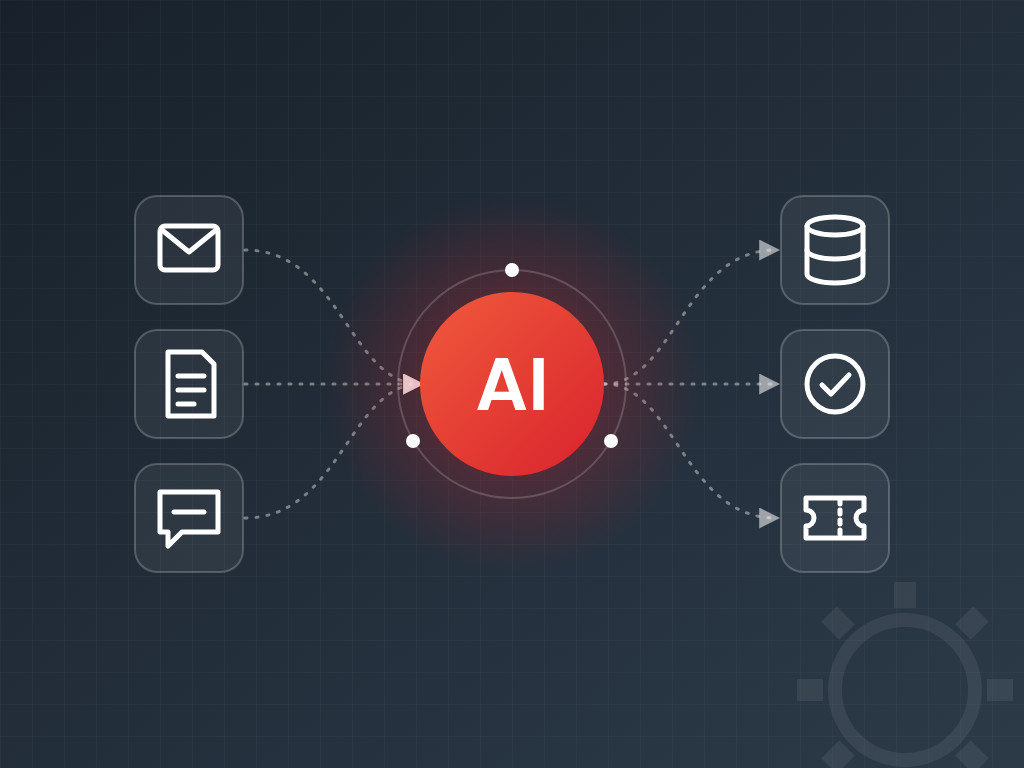
AI assistants become truly useful in a company when they do more than chat – when they can access company data and systems: look up an order, create a support ticket or find a contract. That is what the Model Context Protocol (MCP) is for.
What is MCP?
MCP is an open standard published by Anthropic in late 2024 and since adopted by most major AI providers and developer tools. It is often called the "USB-C port" of AI integrations: just as a USB-C port accepts any device, an MCP server can be used from any MCP-compatible AI client.
The protocol distinguishes three roles:
- Host: the application in which the user works with AI (for example a desktop AI app or a development environment).
- Client: the component inside the host that maintains the connection to a server.
- Server: the program that "translates" your systems into capabilities the AI understands.
What does an MCP server offer?
- Tools: executable operations such as
get_order_statusorcreate_ticket, with precisely described inputs. - Resources: readable data such as documents, database records or configuration.
- Prompts: pre-written, parameterised instruction templates for common tasks.
A server can run locally on the user's machine (over stdio) or as a remote service over HTTP, for which the specification describes OAuth-based authorisation.
Business use cases
- A sales rep asks the AI: "What is the status of last week's order from Acme Ltd.?" – the MCP server queries the ERP.
- Customer support: the AI summarises an incoming complaint and creates a ticket in the help desk.
- Management reporting: the AI gathers weekly figures from several systems and builds a table.
- Development: the coding assistant can access internal documentation and the issue tracker.
A well-built MCP server is written once, but any current or future MCP-compatible AI tool can use it – no separate integration for every new AI product.
Security: what to watch out for
When AI can perform actions, security is paramount. The key principles:
- Least privilege: expose only the operations you really need, ideally starting read-only.
- Confirmation: require human approval before operations that modify or delete data.
- Prompt injection defence: text coming from external sources (such as an email) may contain malicious instructions. Treat it as data, not as commands.
- Logging: keep a searchable log of every call initiated by the AI.
- Authentication: on remote servers, access should happen with the user's own permissions.
How to get started
Choose one system and two or three common, low-risk queries. A first MCP server like this can be built and tested in a few days with the official TypeScript or Python SDK, then extended step by step with more tools and systems based on experience.